Data Modeling (Entities)
Data modeling in Struktural involves defining EntityDefinition objects. These definitions dictate both the physical database tables (via EF Core) and the generated C# POCOs.
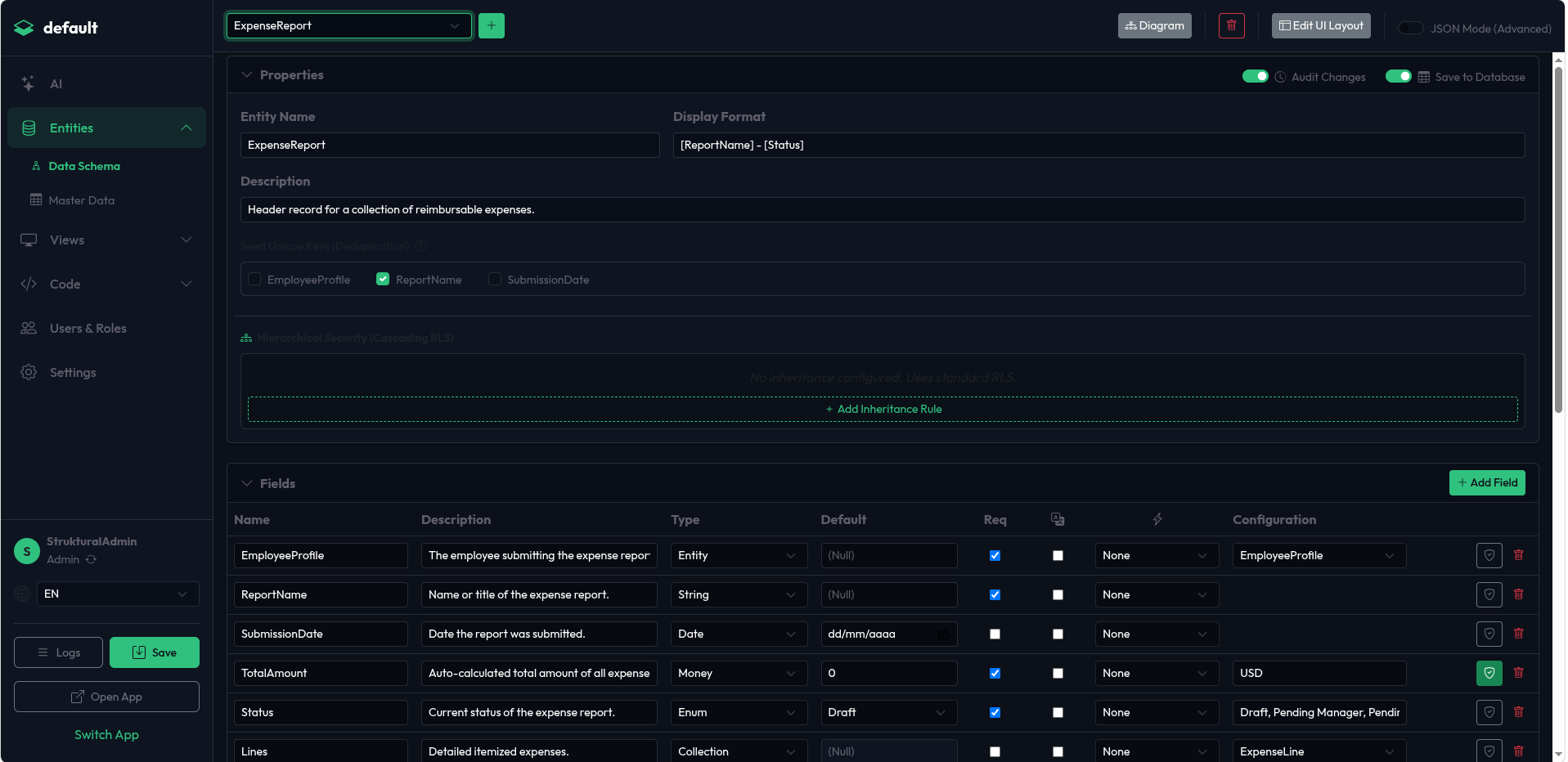
Modeling via the Studio UI
In the Data Schema module, you can add a new Entity by clicking "Add New Entity".
- Entity Properties: In the right-hand properties pane, define the
Name(strict PascalCase, e.g.,CustomerInvoice). You can toggle Audit Changes (enables WORM tracking) or Save to Database (if unchecked, makes it a Virtual Entity in memory). - Fields: Click "Add Field" to define properties. You select the Type from a dropdown (String, Int, Decimal, Enum, Entity, Collection, Metadata, etc.).
- Validation Rules: Click the Shield icon next to a field to open the Validation Panel. Here you can configure Min/Max values, String Length constraints, Regex patterns, or write Dynamic LINQ expressions for Conditional Requirements.
- Relationships:
- To create a Many-to-One relationship (Foreign Key), add a field of type
Entityand select the target entity. Crucial: Name the field exactly as the concept (e.g.,Customer). Do not append "Id"; the engine handles the physicalCustomerIdcolumn automatically. - To create a One-to-Many relationship, add a field of type
Collectionon the parent entity, targeting the child entity.
- To create a Many-to-One relationship (Foreign Key), add a field of type
The Generated JSON (app-schema.json)
When you save the schema, the Studio generates an array of EntityDefinition objects.
{
  "Entities": [
    {
      "Name": "Project",
      "Description": "Manages client projects.",
      "IsVirtual": false,
      "IsAudited": true,
      "DisplayFormat": "[Code] - [Name]",
      "Fields": [
        {
          "Name": "Code",
          "Type": "String",
          "IsRequired": true,
          "Validation": { "MaxLength": "20" }
        },
        {
          "Name": "Name",
          "Type": "String",
          "IsRequired": true
        },
        {
          "Name": "Client",
          "Type": "Entity",
          "IsRequired": true,
          "Relation": {
            "Entity": "Customer",
            "OnDelete": "Restrict"
          }
        },
        {
          "Name": "Tasks",
          "Type": "Collection",
          "IsRequired": false,
          "Relation": {
            "Entity": "ProjectTask"
          }
        }
      ]
    }
  ]
}
Advanced Field Types
Confidential Data (Encryption)
If you select ApplicationWideSecureString or UserSecureString in the Studio, the field is treated as highly sensitive.
- JSON Impact:
"Type": "ApplicationWideSecureString". - Behavior: The database column uses a standard text type, but the Entity Framework layer transparently encrypts the data using AES-256 before insertion and decrypts it upon read.
Dynamic Attributes (EAV Metadata)
If your domain requires users to define custom properties at runtime (e.g., a "Product Specs" dictionary where different products have different attributes like "Weight", "Voltage", "Color"), select the Metadata type.
- JSON Impact:
"Type": "Metadata". - Behavior: The engine creates an Entity-Attribute-Value (EAV) shadow table named
{EntityName}_Metadata. In the API, this field expects a JSON array of objects:[{"AttributeName": "Color", "StringValue": "Red"}].
File and Image Handling
When you need to store documents or pictures, use the File, SecureFile, Image, or Audio types.
- JSON Impact:
"Type": "Image". - Behavior: Do not create a relationship to the system file table manually. By declaring the type as
Image, the engine automatically establishes a Foreign Key toStruktural_Sys_Fileand instructs the frontend to render upload dropzones instead of standard text inputs.