Data Mapping
When calling an external API, you frequently need to transform data from your internal Struktural database into the specific format expected by the external endpoint.
Instead of writing verbose mapping code manually in a C# script, Struktural offers declarative Mappings.
The Mapped Input/Output Entities
On a ServiceEndpointDefinition, you can specify a MappedInputEntity and a MappedOutputEntity.
If these are set, the dynamic compiler generates an overloaded helper method in C# (e.g., ChargeFromInvoice()) that accepts your internal Invoice entity, applies the mappings to populate the DTO, calls the API, and maps the response back to an output entity.
Visual Data Mapper (UI Approach)
In the APIs module, select an endpoint to open its configuration.
- Use the Input Entity and Output Entity dropdowns to establish the mapping context.
- In the mapping table below, the left column represents your source data. You can type
@in the input box to trigger IntelliSense and traverse your selected entity's fields. - The right column represents the target API payload. It provides a dropdown of all available Body fields, Query strings, and Path parameters defined in the API's specification.
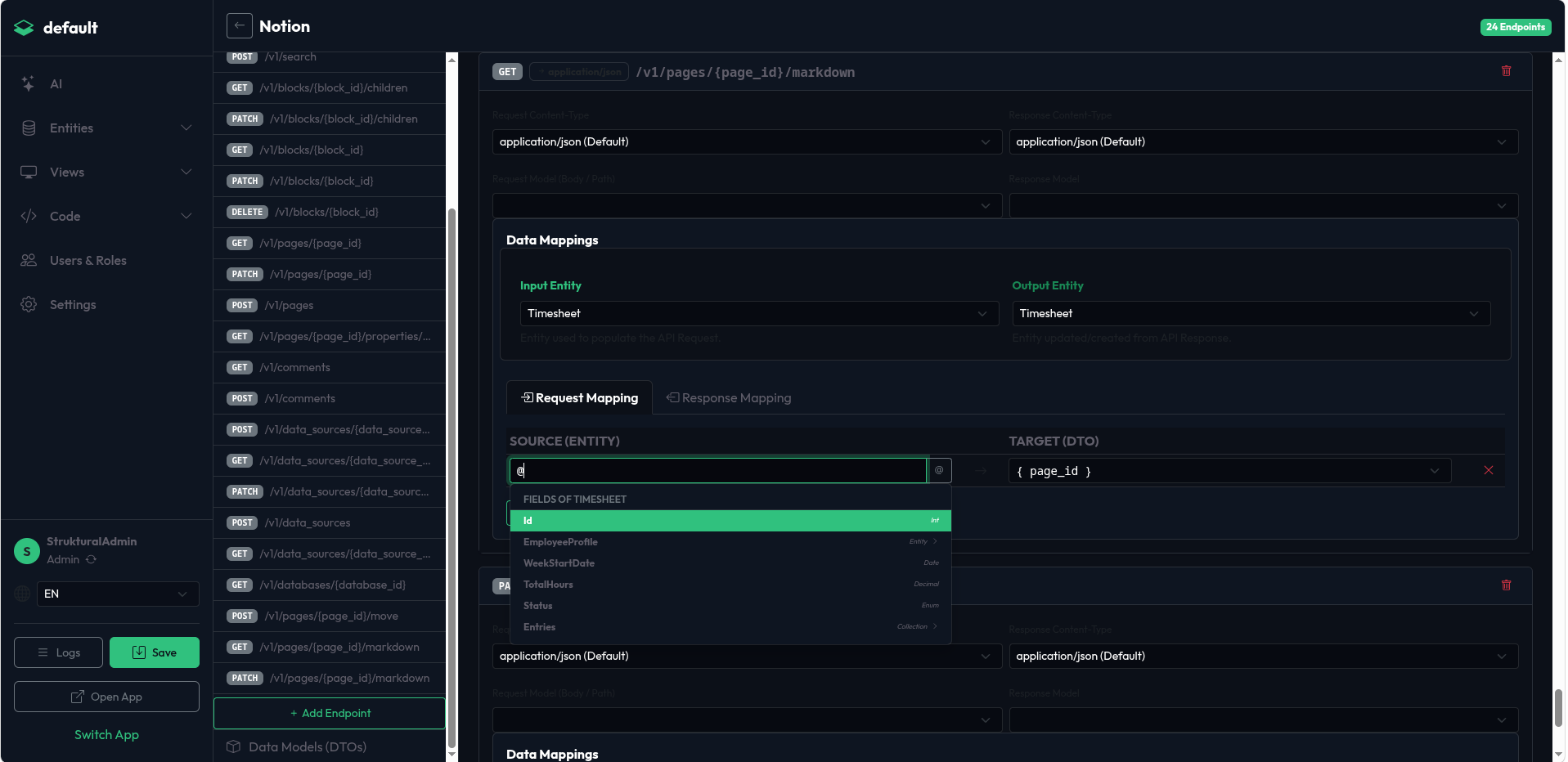
Mapping Definitions
The Mappings array defines the translation logic.
- Direction:
"Input"(Entity -> DTO) or"Output"(DTO -> Entity). - TargetPath: The destination property using dot-notation. For inputs, prefix with
body.,path., orquery.. - SourceExpression: The source property. For inputs from an Entity, prefix with
@(e.g.,@Entity.TotalAmount). Can also be a constant string or number.
Example JSON Mapping
"Endpoints": [
  {
    "Name": "CreateCustomer",
    "Path": "/v1/customers/{id}",
    "Method": "POST",
    "RequestModelName": "CustomerCreateDto",
    "MappedInputEntity": "Client",
    "Mappings": [
      { "Direction": "Input", "TargetPath": "path.id", "SourceExpression": "@Entity.ExternalId" },
      { "Direction": "Input", "TargetPath": "body.email", "SourceExpression": "@Entity.EmailAddress" },
      { "Direction": "Input", "TargetPath": "body.metadata.source", "SourceExpression": "StrukturalApp" },
      { "Direction": "Output", "TargetPath": "StripeCustomerId", "SourceExpression": "id" }
    ]
  }
]
File Upload Mappings
If the endpoint accepts multipart/form-data, you can map an Image or File field directly. The engine will extract the physical bytes from the internal Blob Storage and transmit them over HTTP automatically.
{ "Direction": "Input", "TargetPath": "body.document_file", "SourceExpression": "@Entity.ScannedContract" }